
One of the most important things to understand when using the DJI Osmo Mobile 6 is the way the gimbal naturally responds to movement. If you are new to smartphone gimbals, the motion may feel a little “loose” at first. This is completely normal. Unlike a rigid handheld mount, the Osmo Mobile 6 is designed to create smooth and fluid camera motion rather than reacting instantly with abrupt stops and starts. That means when you begin moving, the gimbal may take a brief moment to follow your motion, and when you stop, it may continue moving slightly before gently settling into its final position.

This behavior is commonly described as “ease in” and “ease out.” In practical terms, it means the gimbal softens the beginning and end of your movements to make your footage look more cinematic and less jerky. Instead of snapping suddenly from one angle to another, the Osmo Mobile 6 tries to transition smoothly. While this helps create more professional-looking video, it can also take some practice to control accurately, especially when you are trying to frame a specific subject quickly.
For example, if you are panning toward a person, object, or scene and you stop exactly when your subject reaches the center of the frame, the gimbal may continue moving a little farther before settling. As a result, the final shot may overshoot the framing you intended. A helpful technique is to stop your movement slightly before reaching the exact composition you want. Then allow the gimbal’s natural smoothing motion to “ease” into the final frame. With a bit of practice, this becomes much easier to predict, and your camera movements will look more controlled and intentional.
This is especially useful when filming cinematic reveals, tracking shots, travel footage, or slow subject pans. Rather than fighting the gimbal, try working with its motion characteristics. Move more gently, anticipate the end of your shot, and avoid sudden direction changes whenever possible. Smooth hand movement combined with the Osmo Mobile 6’s stabilization system will give you the best results.
If you feel that the gimbal is drifting too much or taking too long to respond, you can adjust the motor sensitivity and control settings inside the app. By changing these settings, you can make the gimbal react faster or feel tighter, depending on your shooting style. Users who prefer more responsive control may want to increase sensitivity, while those aiming for softer cinematic motion may prefer lower responsiveness. Experimenting with these settings can make a big difference in how natural and comfortable the gimbal feels during real-world use.
In short, mastering “ease in, ease out” is part of learning how to get the best performance from the DJI Osmo Mobile 6. Once you understand how the gimbal starts and finishes motion, you can plan your shots better, improve your framing accuracy, and create smoother, more professional-looking video with your smartphone.
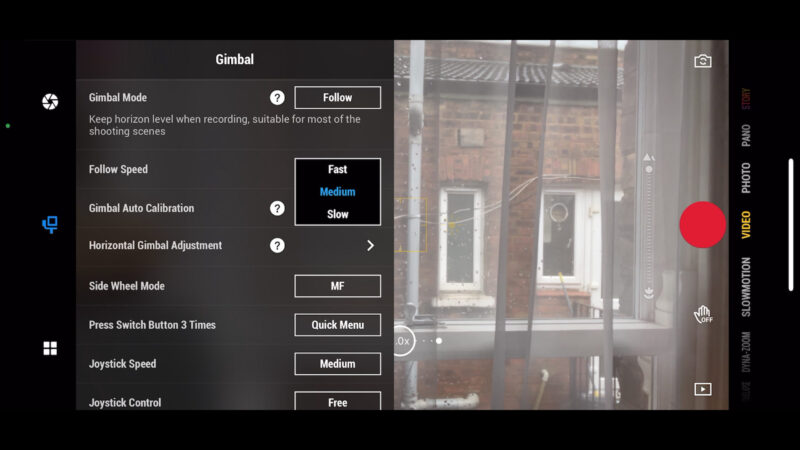
The image above illustrates a practical example of the kind of smooth camera motion that the Osmo Mobile 6 is designed to produce. By understanding how the gimbal eases into movement and eases out when stopping, users can achieve cleaner transitions, steadier framing, and more visually pleasing results in everyday shooting situations.