Mimo Quick Guide DJI Osmo Mobile 6
If you’re out filming and you can’t remember what a particular button does or how to activate a certain feature, there’s a quick way to remind yourself. Open the settings in the Mimo app by tapping the 3 dots in the bottom left corner, go to the General settings and then go to Gimbal Functions overview.
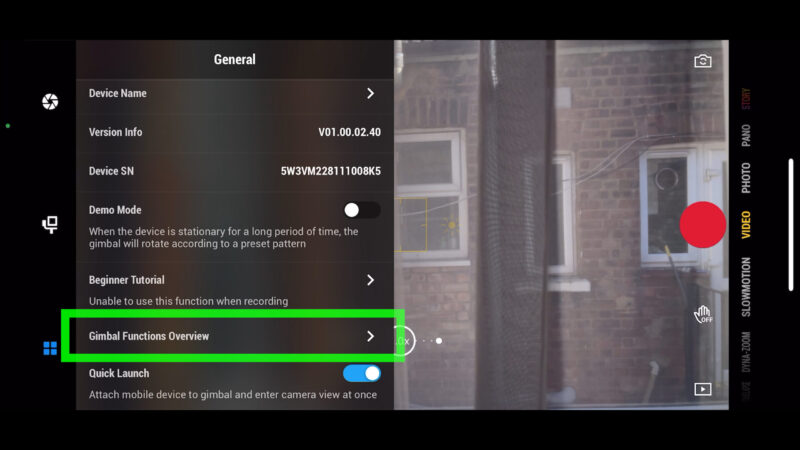
Here you will find 3 screens which tell you what each button does and the meaning of all the lights and indicators.
Mimo Quick Start
A new feature of the Osmo Mobile 6 gimbal is a Quick Start feature which is supposed to automatically start the Mimo app as soon as you mount the phone to the gimbal. So this feature only works with more recent models of iPhone.
In fact, it doesn’t go directly to Mimo. Instead, it sends a notification and then you tap the notification to open the app. I think that does make it slightly easier, especially if you have lots of apps to scroll through.
Now, the fact it sends you a notification is really important. Because I just wasted many hours trying to work out why this feature wasn’t working. Probably more hours than I will ever save using this feature.
So first, make sure your iPhone isn’t in do not disturb mode, like mine was. In this mode you won’t get any notifications from any apps, including Mimo.
Next, go into Mimo settings, select the general tab, scroll down and toggle on Quick Launch.
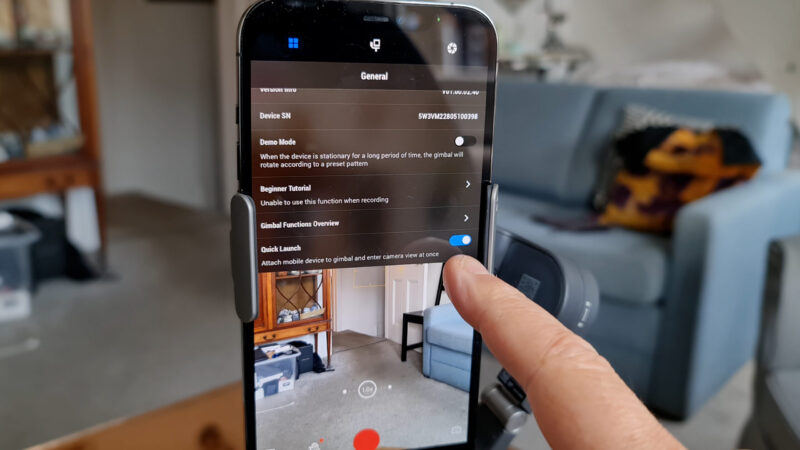
In your iPhone settings you also need to enable a few settings.
Open settings for your iPhone. Go to the DJI Mimo app and tap that. Tap Notifications and allow notifications. Make sure Location and Precise Location are enabled for the app.
And now when you place the iPhone onto the Osmo Mobile 6 you should get this notification. Tap and off you go.
https://momofilmfest.com